
Protocols
ACME
A private RFC 8555 directory for cert-manager, Caddy, certbot, lego, and acme.sh.
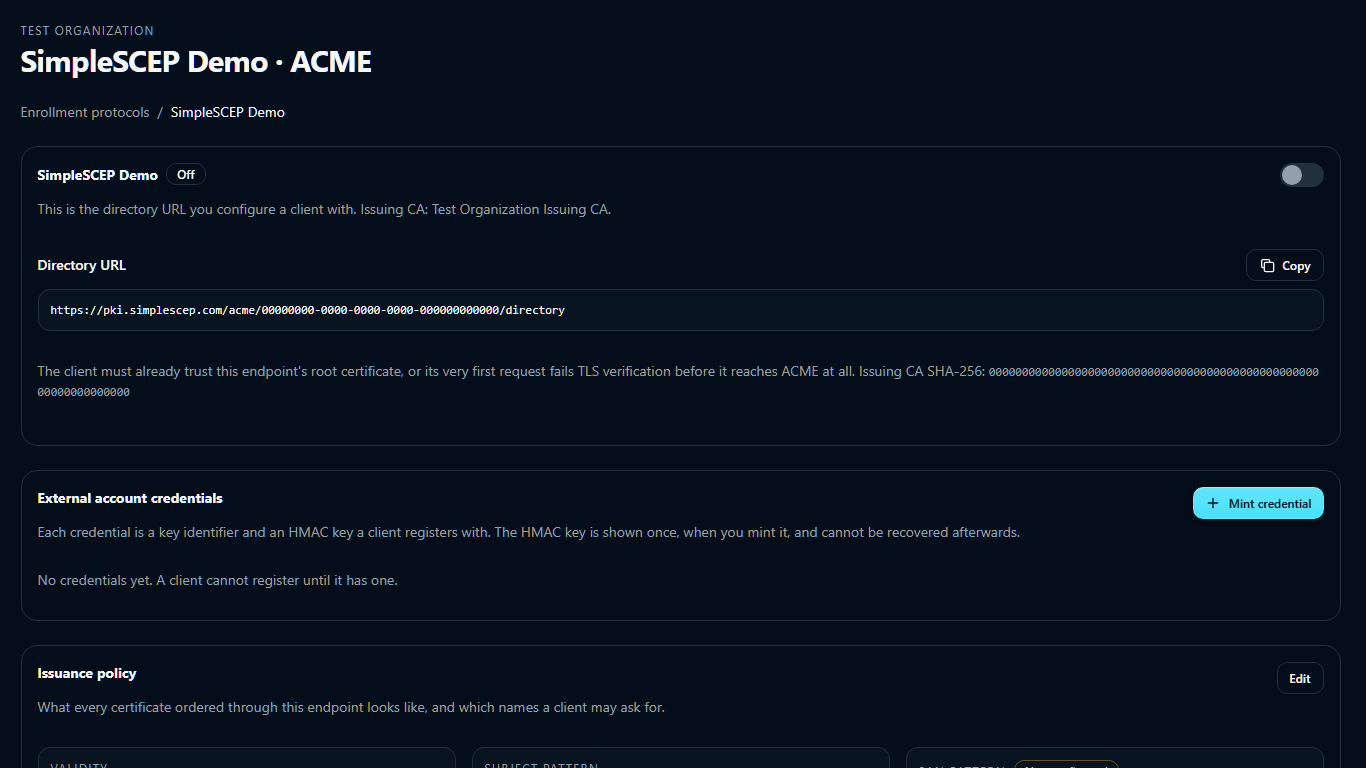
Use ACME for automated clients such as ingress controllers, load balancers, reverse proxies, and service meshes. Configure the directory URL:
https://pki.example.com/acme/<endpoint-id>/directory
Clients discover the other routes from the directory. HTTPS is required.
On the ACME tab of SCEP · ACME · EST, select Add endpoint, enter a name, and select an issuing CA.
Authorizations arrive already valid
SimpleSCEP creates valid authorizations, so clients skip the challenge.
Public challenges cannot validate private names that resolve only inside your network.
Clients authenticate at registration with an External Account Binding credential (RFC 8555 §7.3.4). Orders are restricted by:
- the identifier pin on that credential, if you set one — an exact list of names;
- the endpoint's SAN pattern, which applies to every account on the endpoint.
Authorizations and their challenge are created with valid status.
Use identifier pins or a restrictive SAN pattern. Wildcard identifiers are not supported.
External account credentials
A credential contains a key identifier (kid) and HMAC key. Under External account credentials, select Mint credential.
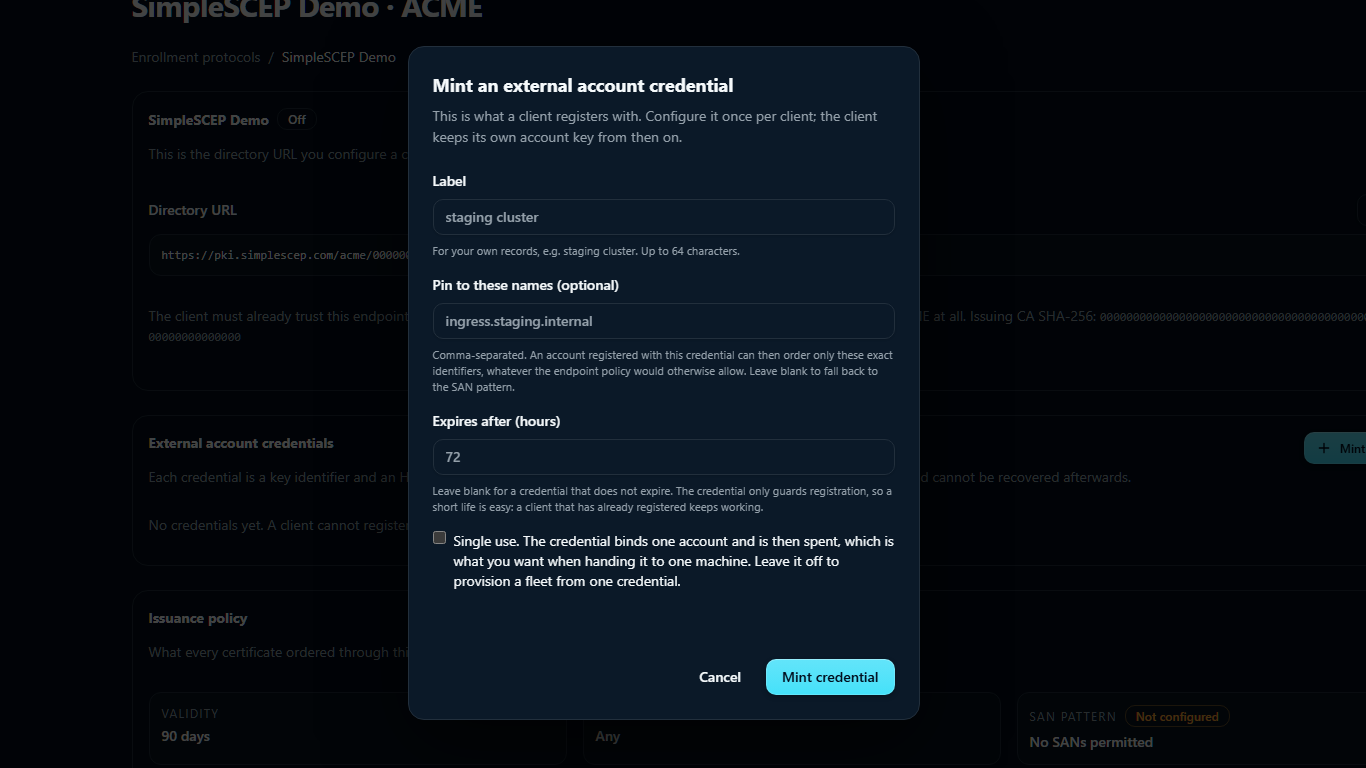
The HMAC key is shown once. Mint another if it is lost.
| Field | What it does |
|---|---|
| Label | For your records only. Not sent to the client |
| Pin to these names (optional) | Comma-separated exact identifiers. An account registered with this credential can order only these. Blank falls back to the endpoint's SAN pattern |
| Expires after (hours) | Registration window. Blank never expires. Existing accounts keep working after expiry |
| Single use | Restricts the credential to one account |
Revoking a credential also deactivates every account it registered. Certificates already issued are not revoked — do that from the Certificates page if they should stop working.
For provisioning scripts, the same route accepts JSON:
curl -sS -X POST \
  https://pki.example.com/api/acme/endpoints/<endpoint-id>/credentials \
  -H 'Content-Type: application/json' \
  -d '{"label":"ingress-prod","identifiers":["ingress.example.internal"],"single_use":false,"ttl_hours":24}'

# → {"directory":"…/directory","kid":"…","hmac_key":"…","single_use":false}
Configure a client
Every client needs three things: the directory URL, the kid, and the HMAC key.
cert-manager
apiVersion: cert-manager.io/v1
kind: ClusterIssuer
metadata:
  name: simplescep
spec:
  acme:
    server: https://pki.example.com/acme/<endpoint-id>/directory
    email: [email protected]
    privateKeySecretRef:
      name: simplescep-account-key
    externalAccountBinding:
      keyID: <kid>
      keySecretRef:
        name: simplescep-eab
        key: secret
    solvers:
      - http01:
          ingress: {}
cert-manager requires the solvers block, but does not use it because the authorization is already valid.
Caddy
{
  acme_ca https://pki.example.com/acme/<endpoint-id>/directory
  acme_eab {
    key_id <kid>
    mac_key <hmac-key>
  }
}
certbot
certbot certonly \
  --server https://pki.example.com/acme/<endpoint-id>/directory \
  --eab-kid <kid> --eab-hmac-key <hmac-key> \
  -d service.example.internal
lego
lego --server https://pki.example.com/acme/<endpoint-id>/directory \
  --eab --kid <kid> --hmac <hmac-key> \
  --domains service.example.internal --email [email protected] run
acme.sh
acme.sh --register-account \
  --server https://pki.example.com/acme/<endpoint-id>/directory \
  --eab-kid <kid> --eab-hmac-key <hmac-key>
Distribute the root before enrollment. Use the container trust store for cert-manager, the OS trust store for certbot and acme.sh, or SSL_CERT_FILE for lego.
Issuance policy
| Setting | Effect |
|---|---|
| Validity | 1–3650 days. Default 90 |
| Subject pattern | Regular expression the CSR's subject must match. Applied at finalize |
| SAN pattern | Regular expression each ordered identifier must match. Applied one name at a time, at order time |
| Permitted extended key usages | Bounded by the issuing CA's own issuance profile |
The SAN pattern is checked at order time. Rejections identify the disallowed name.
What the CSR must contain
The CSR identifiers must exactly match the order. Its common name, if present, must be one of them. Email, URI, and otherName SANs are rejected.
A rejection usually means the client changed between ordering and finalizing.
Renewal and revocation
Renewal is a new order for the same identifiers and consumes no additional identity.
Under RFC 8555 §7.6, revocation must be signed by the ordering account or the certificate's private key.
The reason field takes an RFC 5280 code, and only the codes this product records are accepted:
| Code | Recorded as |
|---|---|
| 0 | unspecified |
| 1 | key compromise |
| 3 | affiliation changed |
| 4 | superseded |
| 5 | cessation of operation |
Other values return badRevocationReason.
ACME Renewal Information (RFC 9773) is not implemented. The directory omits renewalInfo.
Delete an endpoint
Delete endpoint requires the endpoint name for confirmation:
- The directory URL stops responding immediately. Every configured client fails its next order.
- Renewal fails. Migrate clients to the replacement directory URL before deletion.
- Certificates it issued are not revoked. They stay valid until they expire.
- Every credential, registered account, and order record is deleted. The certificates stay listed under Certificates.
To stop enrollment without deleting data, turn the endpoint off.
Notes
- Administration requires an administrator session. There is no service-account authentication yet.
- Errors reach clients as RFC 8555 problem documents (
application/problem+json), and the reason is also recorded on the order. badNonceis normal. Clients fetch a fresh nonce and retry automatically; it is not a fault.- Abandoned orders expire after seven days and are swept hourly, along with unspent nonces older than an hour.
- An issuing CA cannot be deleted, rotated, or deactivated while an enabled endpoint is bound to it.