
Protocols
EST
RFC 7030 enrollment for routers, gateways, appliances, and IoT fleets.
Use EST for network infrastructure such as VPN gateways, routers, switches, appliances, and IoT fleets.
Each endpoint has its own base URL:
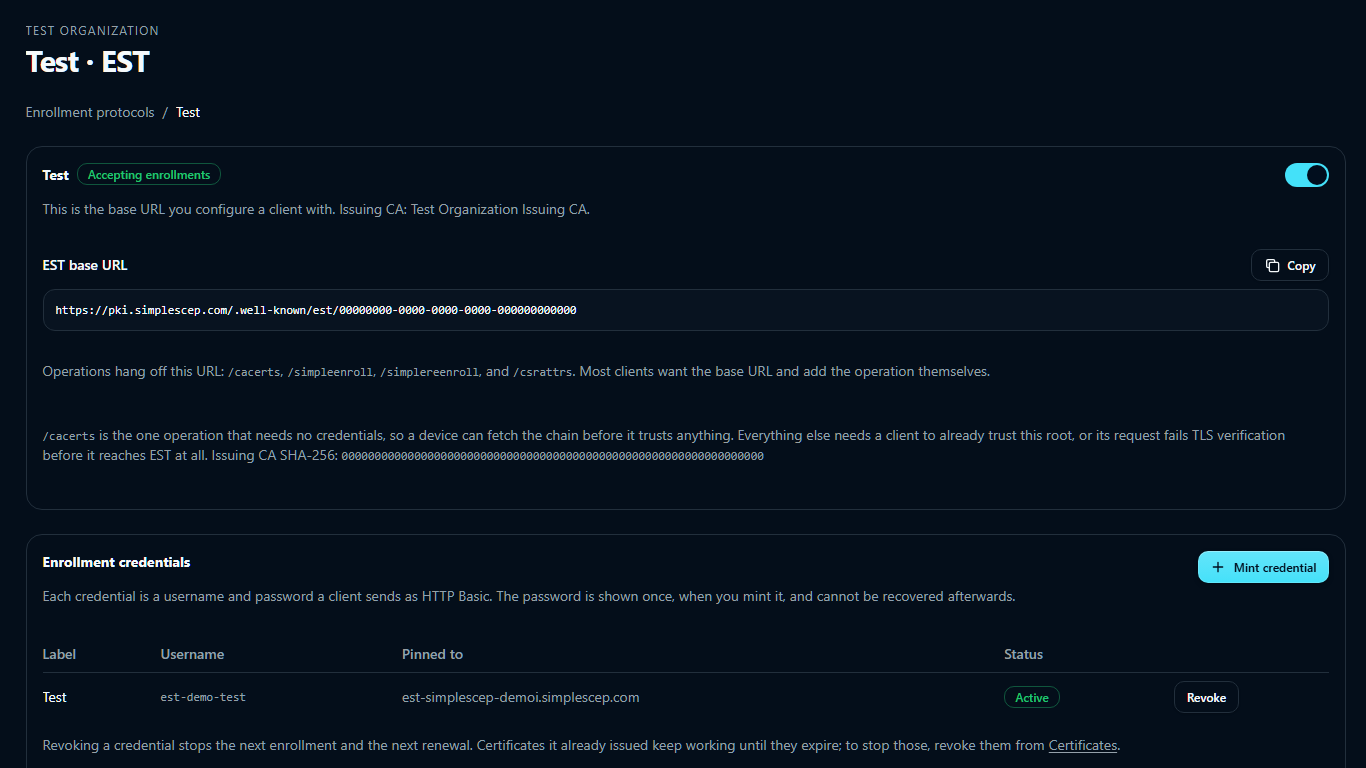
https://pki.example.com/.well-known/est/<endpoint-id>
The base provides /cacerts, /simpleenroll, /simplereenroll, and /csrattrs. Most clients require only the base URL. HTTPS is required.
On the EST tab of SCEP · ACME · EST, select Add endpoint, enter a name, and select an issuing CA.
Clients authenticate with a password, not a certificate
Configure your client for HTTP Basic. A client set up to present a TLS client certificate will be refused.
SimpleSCEP terminates TLS before the application, so it uses HTTP Basic over server-authenticated TLS as permitted by RFC 7030 §3.2.3.
The username and password are sent with every enrollment and re-enrollment.
Plaintext requests return 403 without an authentication challenge. Revoke any credential sent over plaintext.
/simplereenroll is authenticated by two things together:
- the same Basic credential, and
- a binding check — the subject in the CSR must already hold a live certificate this endpoint issued, and the request must fall inside the renewal window.
An expired EST credential blocks both enrollment and renewal. Leave the expiry blank for long-lived fleets.
Enrollment credentials
Under Enrollment credentials, select Mint credential. Use one per fleet or device. The password is shown once; mint another if it is lost.
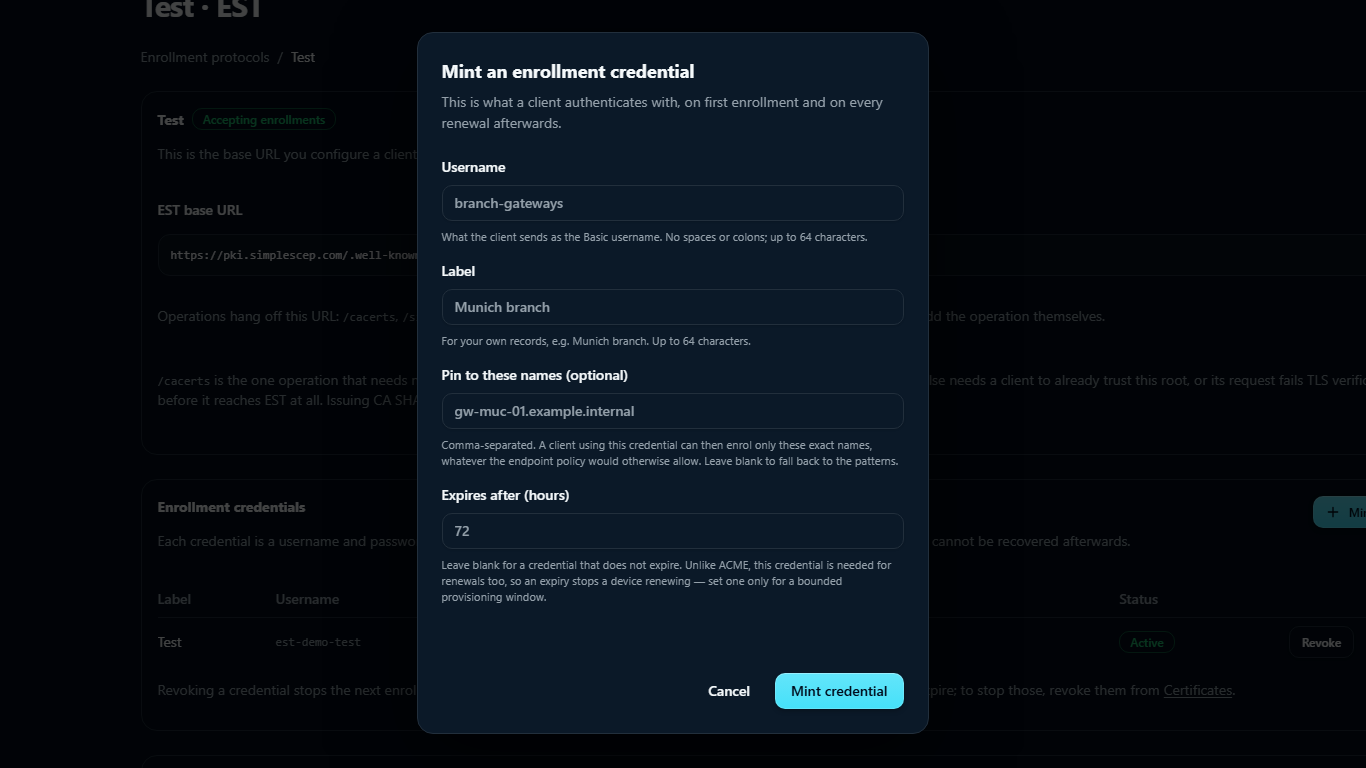
| Field | What it does |
|---|---|
| Username | The Basic username. No spaces or colons, up to 64 characters, and unique per endpoint, case-insensitively |
| Label | For your records only |
| Pin to these names (optional) | Comma-separated exact names. A client using this credential can enroll only these, checked against the CSR's common name, DNS names, and IP addresses. The match is exact, not a prefix or substring — a CSR common name of gw-muc-01 will not match a pin of gw-muc-01.example.internal. Blank falls back to the endpoint's patterns |
| Expires after (hours) | Bounds how long the credential works, for enrollment and renewal. Blank never expires |
Revoking a credential stops the next enrollment and the next renewal. Certificates already issued keep working until they expire.
For provisioning scripts, the route also accepts JSON:
curl -sS -X POST \
  https://pki.example.com/api/est/endpoints/<endpoint-id>/credentials \
  -H 'Content-Type: application/json' \
  -d '{"username":"branch-gateways","label":"EMEA branches","identifiers":"gw-muc-01.example.internal","ttl_hours":720}'

# → {"url":"…/.well-known/est/<endpoint-id>","username":"branch-gateways","password":"…"}
Configure a client
Every client needs to trust every certificate above the one /simpleenroll hands back — and that's more than one file for most organizations. Two separate things feed into it:
- Your own CA's chain, fetched once from
/cacerts(no credentials needed — see below). This is one certificate for a single-tier CA, or two for a root-plus-issuing-CA setup, which is the common case./simpleenrolland/simplereenrollreturn only the newly issued leaf, never the chain above it, so a client needs this fetched and trusted ahead of time — the same way it needs the credential ahead of time. - The public or private root behind your deployment's TLS certificate, which verifies the connection to the endpoint itself and is independent of your SimpleSCEP CA.
A browser or a machine with a full OS certificate bundle already trusts #2 and needs nothing extra for it. Many EST clients — strongSwan's pki tool included — trust only what you hand them explicitly and don't fall back to a system store, so both are needed regardless of how many certificates are in each.
Fetch your chain once, from a trusted channel, and keep each certificate in its own file — most clients that take an explicit trust list read only one certificate per file or per argument, so a bundle with more than one certificate concatenated together silently loses everything after the first:
curl -s https://pki.example.com/.well-known/est/<endpoint-id>/cacerts \
  | base64 -d | openssl pkcs7 -inform DER -print_certs -out chain.pem
awk '/BEGIN CERTIFICATE/{n++} {print > ("simplescep-ca" n ".pem")}' chain.pem
# simplescep-ca1.pem is the certificate nearest your device's; simplescep-ca2.pem
# (if your CA is root-plus-issuing) is the root above it.
Get the TLS root from your deployment operator through a trusted channel rather than fetching it from the endpoint itself. Use a self-signed trust anchor; a client that only trusts self-signed roots may reject a cross-signed copy of the same key.
strongSwan
pki --est --url https://pki.example.com --label <endpoint-id> \
    --userpass 'branch-gateways:<password>' \
    --in gw-muc-01.req \
    --cacert simplescep-root.pem \
    --cacert simplescep-issuer.pem \
    --cacert deployment-tls-root.pem \
    --outform pem > gw-muc-01.pem
--url is the base URL only. strongSwan builds /.well-known/est/<label>/<operation> itself, so the endpoint ID goes in --label; putting the whole path in --url yields /.well-known/est/<endpoint-id>/.well-known/est/simpleenroll and a 404 that looks like a missing endpoint rather than a malformed request.
--cacert can be repeated, and here it has to be: one for each certificate above, three in a root-plus-issuing setup. strongSwan reads only the first certificate out of each PEM file, so concatenating any of these into one file silently drops the rest — pass each as its own --cacert, never merged.
strongSwan also does not match wildcard certificates when verifying the server's hostname. The deployment hostname must appear explicitly in the TLS certificate's SANs.
Cisco IOS
crypto pki trustpoint SIMPLESCEP
 enrollment url https://pki.example.com/.well-known/est/<endpoint-id>
 enrollment mode est
 enrollment credential BRANCH-GATEWAYS
 subject-name CN=gw-muc-01.example.internal
 revocation-check crl
 auto-enroll 80
auto-enroll 80 re-enrolls at 80% of the certificate lifetime. For a 365-day certificate, use a renewal window of at least 73 days.
IOS ships a broad public trust bundle, so it usually needs only your own CA's chain imported (crypto pki trustpoint/crypto pki authenticate, once per certificate for a root-plus-issuing CA) and not the public root above. Confirm with show crypto pki certificates if enrollment fails at the TLS step rather than at the credential.
libest
estclient -e -s pki.example.com -p 443 \
    --path-prefix /.well-known/est/<endpoint-id> \
    -u branch-gateways -h '<password>' \
    -o ./out --pem-output
libest also trusts only what it's given explicitly — pass every certificate from the section above as its explicit trust anchors, not just your issuing CA's, and not just one file if your CA is root-plus-issuing.
curl, for checking an endpoint by hand
# The chain, with no credentials at all:
curl -s https://pki.example.com/.well-known/est/<endpoint-id>/cacerts \
  | base64 -d | openssl pkcs7 -inform DER -print_certs -noout

# An enrollment:
openssl req -new -newkey rsa:2048 -nodes \
  -keyout gw.key -out gw.csr -subj /CN=gw-muc-01.example.internal
openssl req -in gw.csr -outform DER | base64 > gw.b64
curl -s -u branch-gateways:'<password>' \
  -H 'Content-Type: application/pkcs10' \
  --data-binary @gw.b64 \
  https://pki.example.com/.well-known/est/<endpoint-id>/simpleenroll \
  | base64 -d | openssl pkcs7 -inform DER -print_certs
/cacerts requires no credentials, as required by RFC 7030 §4.1.1. Distribute the resulting chain through a trusted channel; do not fetch it and trust it in one step outside a lab. curl and openssl must also trust the root behind your deployment's TLS certificate.
Issuance policy
| Setting | Default | What it does |
|---|---|---|
| Validity | 365 days | 1–3650. How long each issued certificate lasts |
| Renewal window | 73 days | 1–365. How early /simplereenroll starts working. A device asking sooner is told the date it may come back |
| Subject pattern | blank | Regular expression the CSR's subject must match |
| SAN pattern | blank | Regular expression the CSR's subject alternative names must match |
| Permitted extended key usages | Client authentication | The ceiling on what a CSR may ask for |
Set the renewal window to match the client's renewal timer. For example, auto-enroll 80 requires 73 days for a 365-day certificate.
What the CSR must contain
SimpleSCEP reads the subject and SANs from the CSR.
- Subject and SANs are copied through, and are what the patterns match against.
- The public key must be RSA of at least 2048 bits, or EC on P-256 or P-384.
- The CSR signature must verify. This is the proof of possession.
- Extended key usages come from the CSR extension request. Permitted subsets are preserved; unpermitted usages are rejected. A request with no usages receives client authentication only.
/csrattrs advertises the CA's public-key and signature algorithms. An empty response returns 204 as required by §4.5.2.
Renewal and revocation
Re-enrollment replaces the certificate for the existing identity.
EST has no revocation operation; RFC 7030 leaves revocation to the CA. Revoke from the Certificates page, which publishes to the CRL and answers OCSP immediately.
/serverkeygen and /fullcmc are not implemented. A client that probes them gets a 404 and falls back to /simpleenroll.
Delete an endpoint
- The base URL stops responding immediately. Every device configured with it fails its next enrollment.
- Re-enrollment fails. Migrate devices before deletion.
- Every credential is deleted, so devices lose the ability to enroll and to renew.
- No certificate is revoked. If they should stop working, revoke them before deleting.
To stop new enrollments without deleting credentials, turn the endpoint off.
Notes
- Administration requires an administrator role.
- Failures are a plain HTTP status and a sentence, as §4.2.3 asks for; EST has no problem-document format. A
401carriesWWW-Authenticate: Basic. - A wrong username, a wrong password, and a revoked credential all produce the same
401, and verification runs even for an unknown username, so neither the response nor its timing reveals which usernames exist. - Enrollments appear in the audit log as Certificate issued, alongside SCEP and ACME issuance.
- The endpoint page's activity log records refusals as well as issuance, with the reason the device was given. Only refusals from a client that authenticated are recorded.